


A 22Bet booking code saves time inside the sportsbook because the code brings back a saved bet slip instead of making you rebuild every pick by hand. You can load the code, review the odds, enter your stake, and place the bet from your account on desktop or mobile. For a 5-match accumulator, that can save you a couple of minutes compared with searching for every market again.
What Is a 22Bet Booking Code?
A 22Bet booking code is a short code linked to a saved bet slip. Enter the code in the correct field, and the sportsbook pulls your saved slip back onto the screen so you can continue with the same selections, odds review, stake, and payout check. A booking code is not the same as a promo code. Promo codes connect to offers, while booking codes are only for saved sportsbook slips.
How the 22Bet Booking Code Works
When you enter a booking code, 22Bet looks for the saved bet slip linked to that code and checks whether the markets are still open. If they are, the slip appears again, and you can review it before betting. If the odds changed, a market closed, or the code expired, the slip may not load exactly the same way.
| Code type | Main use | Where it applies |
|---|---|---|
| 22Bet booking code | Restores a saved bet slip | Sportsbook slip area |
| 22Bet promo code | Activates an offer or campaign | Bonus or promo section |
| 22Bet bonus codes | Connect to bonus terms or rewards | Account dashboard/promo flow |
How to Generate Booking Code on 22Bet
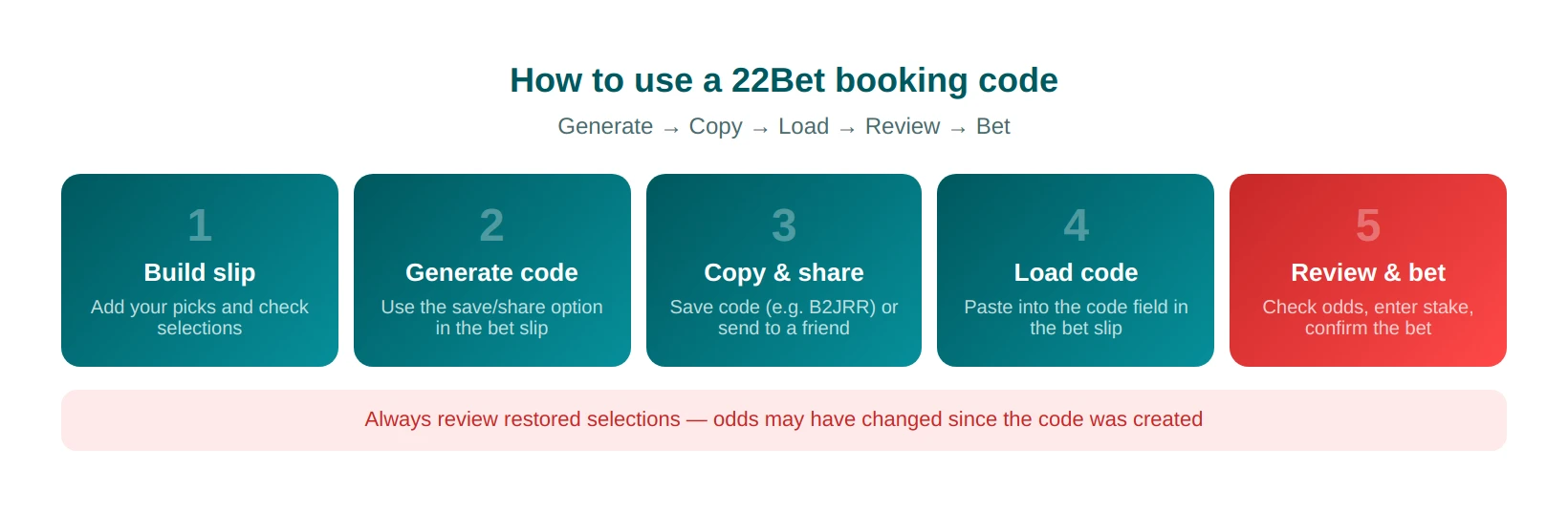
First, build your bet slip and make sure the picks look right. Then use the save or share option in the bet slip to create the code. A booking code usually looks like a short mix of letters and numbers, for example, B2JRR or X7Y2K. After that, copy the code and keep it somewhere safe, like your notes app, if you want to load the same slip later on desktop or mobile.
How to Enter Booking Code on 22Bet
On the website, open your 22Bet account, go to the sportsbook, and add your selections to the bet slip first. Once the slip is ready, open the bet slip panel in the top-right corner and look for the save or share option inside the slip tools. That is the step that generates the booking code. Copy the code when it appears, because you will need it to load the same slip later. Here’s how to load a booking code on 22Bet:
- Add your picks to the bet slip
- Open the slip
- Use the save/share option inside the slip tools
- Copy the generated code
- Paste it into the booking-code field when you want to restore the slip
To load the code later, stay in the sportsbook, open the bet slip again, find the code-entry field near the slip tools, and paste the saved code there. The platform will then try to restore the saved selections for review. On the app, the same action works through the mobile bet slip. How to load a booking code on the 22Bet app is simple: open the sportsbook, add your picks, tap the bet slip icon, and look inside the slip for the save or share function that creates the code. After that, copy the code and keep it for later use. When you want to reopen the same slip, return to the bet slip, find the code-entry section, paste the code, and review the restored selections before placing the bet.
How to Use 22Bet Booking Code to Place a Bet
Once you load the code, review the full slip before you confirm anything. Here’s h**ow to place a bet from a booking code on 22Bet:**
- Check the restored selections
- Confirm the odds
- Enter the stake
- Approve the bet only after the confirmation screen appears.
Example: your friend sends you the booking code B2JRR on WhatsApp for a weekend accumulator. You open 22Bet, paste the code into the slip, check whether the odds are still the same, enter your stake, and place the bet without rebuilding all five matches yourself.
Common Issues When Loading a 22Bet Booking Code
Most errors appear when the saved slip no longer matches what is currently available in the sportsbook. A market may have closed, the odds may have changed, or the code may have expired. That means even when you load the 22Bet code correctly, the original slip may not come back in exactly the same form, so it is always worth checking everything again before you place the bet.
Invalid or Expired 22Bet Booking Code
An invalid or expired code usually means you copied the code incorrectly, the code is incomplete, the event ended, or the saved selections are no longer available. You may see a message like “Invalid code,” “Code expired,” or “Bet slip not found.” If that happens, the easiest fix is to enter the code again carefully or rebuild the missing selections manually.
Booking Code Not Loading on 22Bet App
App-related issues usually come from security checks, encryption updates, you getting logged out, or using an outdated app version on Android or iOS. Closing and reopening the app, logging in again, or updating the app usually fixes the issue. If the code still does not load, try the same code on the desktop site to check whether the problem is with the app or with the slip itself.