


It happens to everyone. You click “Log In” like it’s routine, type what you’re sure is the right password, and it gives an error. You try again and again, and now the account is locked.
You try to reset the password, but the SMS code isn’t coming through, or the reset email has vanished into thin air. Whatever the specific situation, getting back into your 22Bet account is usually very easy, as long as you know which path to take and don’t waste time on the wrong one.
This guide covers the full recovery process for email resets, SMS codes, phone number issues, support escalation, and what to do when none of these options works.
Standard Password Recovery Methods for 22Bet Login
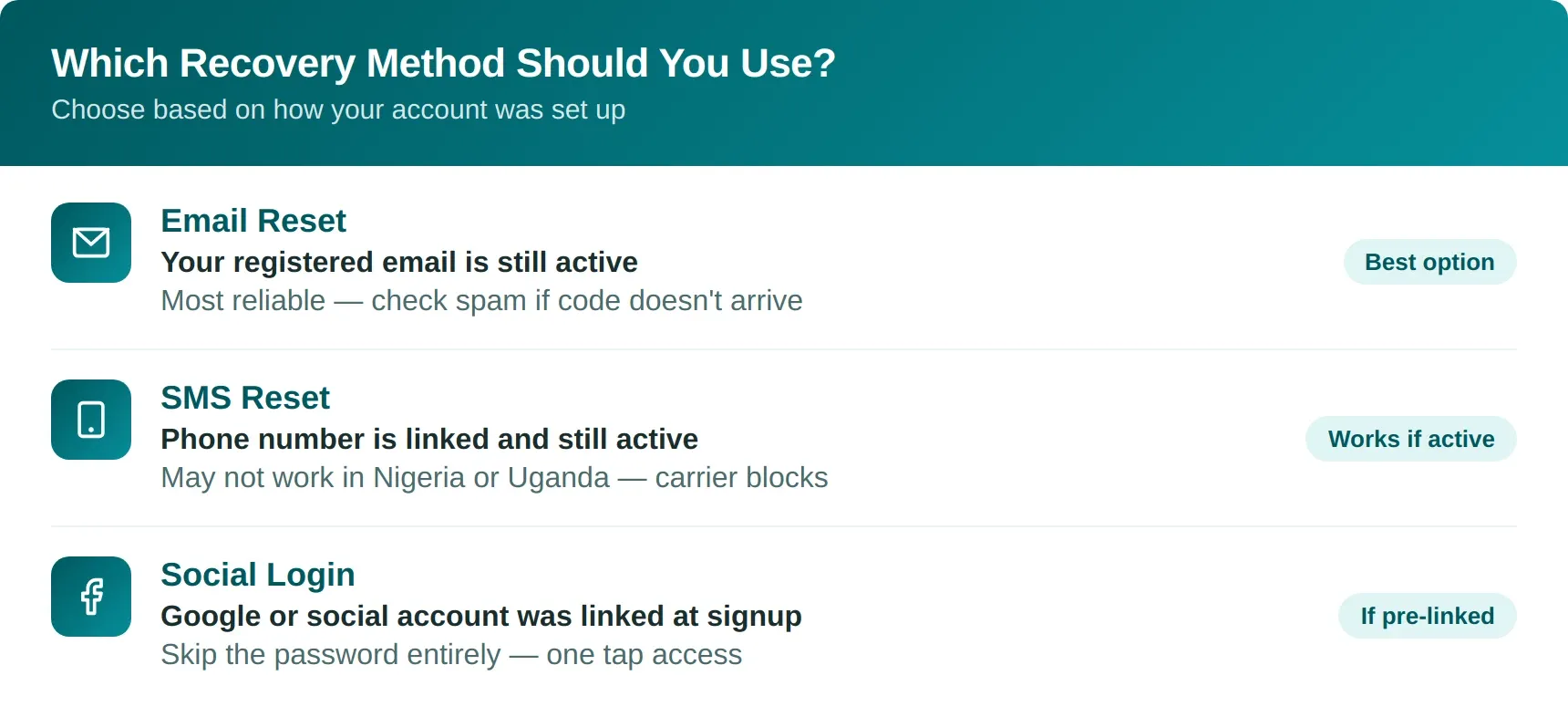
How you recover your account depends on how it was set up. The 22Bet registration and login process can be completed in several ways.
The standard setup uses an email address and a password. Another option uses an active phone number with SMS verification. The third allows users to register and sign in through social networks or messaging platforms, linking their existing social account to their 22Bet account.
Once you are set up using one of these methods, you can log in or regain access using an email address, a phone number, or a one-click social login.
Email-Based Password Reset Process
Most players register using an email address and a password. If you’ve forgotten your password, you’ll need to start the recovery process using your registered email address.
The process itself is simple. Go to the “log in” form, click “Forgot Password,” enter your registered email address, and click “Send Code.”
The platform generates a reset code and sends it to your inbox. Copy that code, enter it into the password reset pop-up to confirm your identity, then create a new password. Once that’s done, you’re good to go.
If you do not receive the reset code by email, check your spam or junk folder and wait 10 minutes before requesting another code.
SMS Code Recovery Using Phone Number
22Bet allows users to add a phone number to their profile and switch the login method from email and password to a phone number and password.
This gives you another way to reset your password if email recovery is not working. However, it only works if the phone number is already linked to your 22Bet account and is still active. Some players change SIM cards or phone numbers but forget to update them in their account settings. Old or inactive numbers will not work here.
The process is almost identical to email recovery. Click “Forgot Password”, choose recovery by phone number, and then enter your number.
Click “Send Code”, enter the verification code you receive, and then create a new password.
Some mobile carriers, particularly in Nigeria and Uganda, treat shortcode messages from international platforms with suspicion. Because of this, some users may not receive the SMS code at all due to carrier-level blocks on the message itself.
When to Use Alternative Login Methods
There are two alternative login methods available. The first is SMS login, where you simply enter your registered phone number and receive a verification code to access the account. This removes the headache of remembering a password. However, because of carrier-level filtering issues, SMS codes can sometimes be delayed or fail to arrive altogether.
The second option is social login. This is often the easiest method because many users already have their Google or social accounts connected to their phones and desktops. With a simple tap, the platform sends a confirmation request through the linked account, allowing quick access without manually entering login details.
It is generally advised to keep social logins separate from betting accounts for security reasons, and to use these methods only if you have forgotten your password but do not want to go through the full reset process.
For these options to work properly, your phone number must already be verified and linked to your profile, while any social login must be connected through the account settings beforehand.
Step-by-Step Guide to Resetting Your Password
Resetting your 22Bet password only takes a few minutes if you have access to your registered email address or phone number. The following recovery steps are identical for both methods.
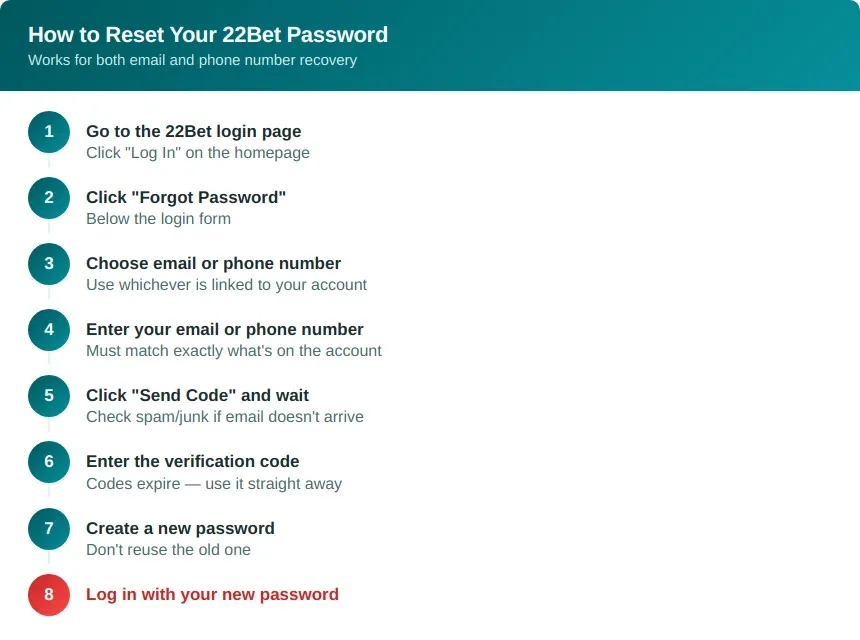
If the code does not arrive immediately, check your spam or junk folder for an email from 22Bet. Alternatively, you can wait a few minutes before requesting another code through a different recovery method, like switching from email recovery to phone verification, or vice versa.
Note:
- Forgot your password: Do not repeatedly click the “Forgot Password” button out of frustration. Stressed players often spam the request option, which can trigger an automated security response that temporarily blocks further attempts and prolongs the recovery process.
- Creating a password: When creating a new password, avoid reusing any part of the old one, even if you suddenly remember it halfway through the reset process. Always create a different password for better security.
SMS and Phone Lockout Recovery Issues
What to Do If SMS Codes Don’t Arrive
Start with the basics. Check your network signal, make sure aeroplane mode is turned off, and confirm your phone is receiving normal SMS messages. If everything seems fine, the issue is most likely with the mobile carrier instead of 22Bet.
Avoid spamming multiple code requests. This can invalidate older codes and temporarily block new ones. Wait a few minutes before trying again. If SMS recovery still fails, switch to email recovery instead.
Some carriers, especially in Nigeria and Uganda, block or delay international shortcode SMS messages. As a result, the verification code may never arrive even if the request was successful. If the issue keeps repeating, contact your mobile carrier to find out if international shortcode SMS are blocked on your number.
Issues With Lost or Changed Phone Numbers
If you changed your number or no longer use the phone number linked to your 22Bet account, SMS recovery will not work. In that situation, you will need to contact support and complete a manual verification process to update your number and regain access to your account.
Support may request identification documents or account details to confirm ownership of the account. Submitting incorrect or incomplete information can delay the recovery process.
In case your phone is lost or stolen, notify 22Bet support immediately, the same way you would notify your bank if your card got taken. Someone with access to your phone may be able to open the 22Bet app and gain access to your funds or sensitive information linked to your account.
Network or Carrier Delays in Verification Messages
Carrier delays in verification SMS messages are common in parts of West and East Africa. Some networks automatically flag these messages as spam or suspicious activity, which prevents the verification code from reaching your phone.
If this keeps happening, contact your mobile carrier and ask if the 22Bet shortcode can be added to the approved list on your SIM.
Email Recovery Quick Fixes
Checking Spam, Promotions, and Junk Folders
Recovery codes from betting platforms are often filtered into spam, junk, or promotions folders. If the reset code is not showing in your inbox, check all folders before requesting another one.
Expired or Invalid Recovery Codes
Recovery codes only stay active for a limited time. If the code expires, request a new one. Once a new code is generated, older codes stop working automatically.
Avoid requesting multiple codes back-to-back. This can invalidate previous requests and create confusion about which code is still active.
Using the Correct Registered Email Address
Many failed recovery attempts happen because the wrong email address is entered. If you use multiple email accounts, try each one. The recovery code will only be sent to the email address linked to your 22Bet account.
Account Restrictions and Security Blocks
There are several reasons why a 22Bet account may become temporarily restricted or blocked during login or recovery attempts.
Temporary Lock After Multiple Failed Attempts
After several incorrect password attempts, the system may temporarily lock the account for security reasons. This usually lasts between 15 and 30 minutes.
Many users make the mistake of repeatedly trying to log in during the lock period, which can extend the restriction further. Instead of continuing with failed login attempts, wait for the timer to expire, then use the password recovery option.
Verification Requirements Before Password Reset
Some accounts require additional verification before a password reset is approved. This can include CAPTCHA checks, confirmation codes, or two-factor authentication (2FA) verification if 2FA was previously enabled on the account.
These checks are designed to prevent unauthorised access and protect the account from forced recovery attempts.
When Account Recovery Requires Support Assistance
If you no longer have access to both your registered email address and phone number, self-service recovery will not work. In this situation, you must contact the 22Bet support team for manual account recovery.
Support may request documentation or account information to verify ownership before restoring access. Providing incorrect or incomplete details can further delay the process.
Contacting Support for Account Recovery
Contacting support should be your last option, as manual recovery typically requires a longer verification process via live chat or email.
Information You Need to Provide for Verification
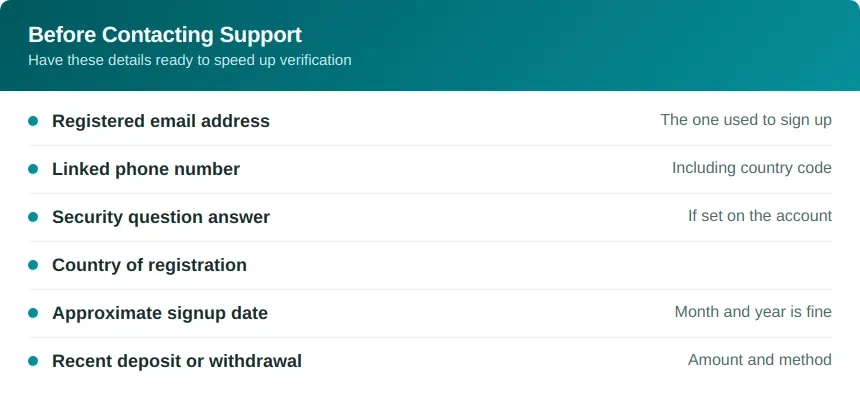
Providing accurate information from the start helps the support team verify account ownership faster.
Identity Checks and Ownership Confirmation
The support team may require identification documents to verify account ownership. This usually includes a government-issued ID and, in some cases, proof of address or payment verification.
Accounts flagged for unusual activity may go through additional verification checks before access is restored.
Expected Response Time and Resolution Process
Live chat is usually the fastest support option, while email responses can take longer depending on the requirements.
Once ownership is confirmed, support may issue a new password recovery code or manually restore account access. Avoid sending repeated messages during the process, as this can further slow down the support queue.
If the required documents are submitted properly, most recovery requests are completed within 24 hours.
How to Prevent Future Lockouts
Once you regain access to your account, take a few minutes to secure it properly and avoid future recovery problems.
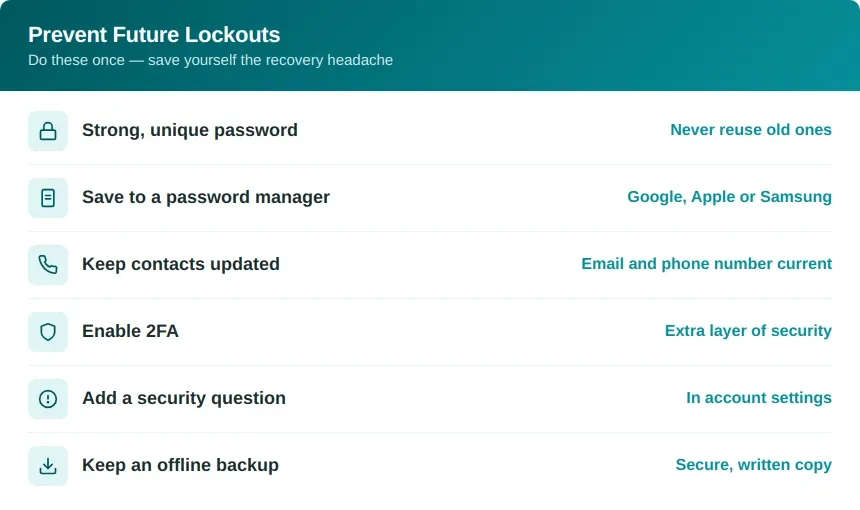
Not updating your account details properly or ignoring basic security checks is one of the main reasons users have difficulty recovering their login credentials later on.