

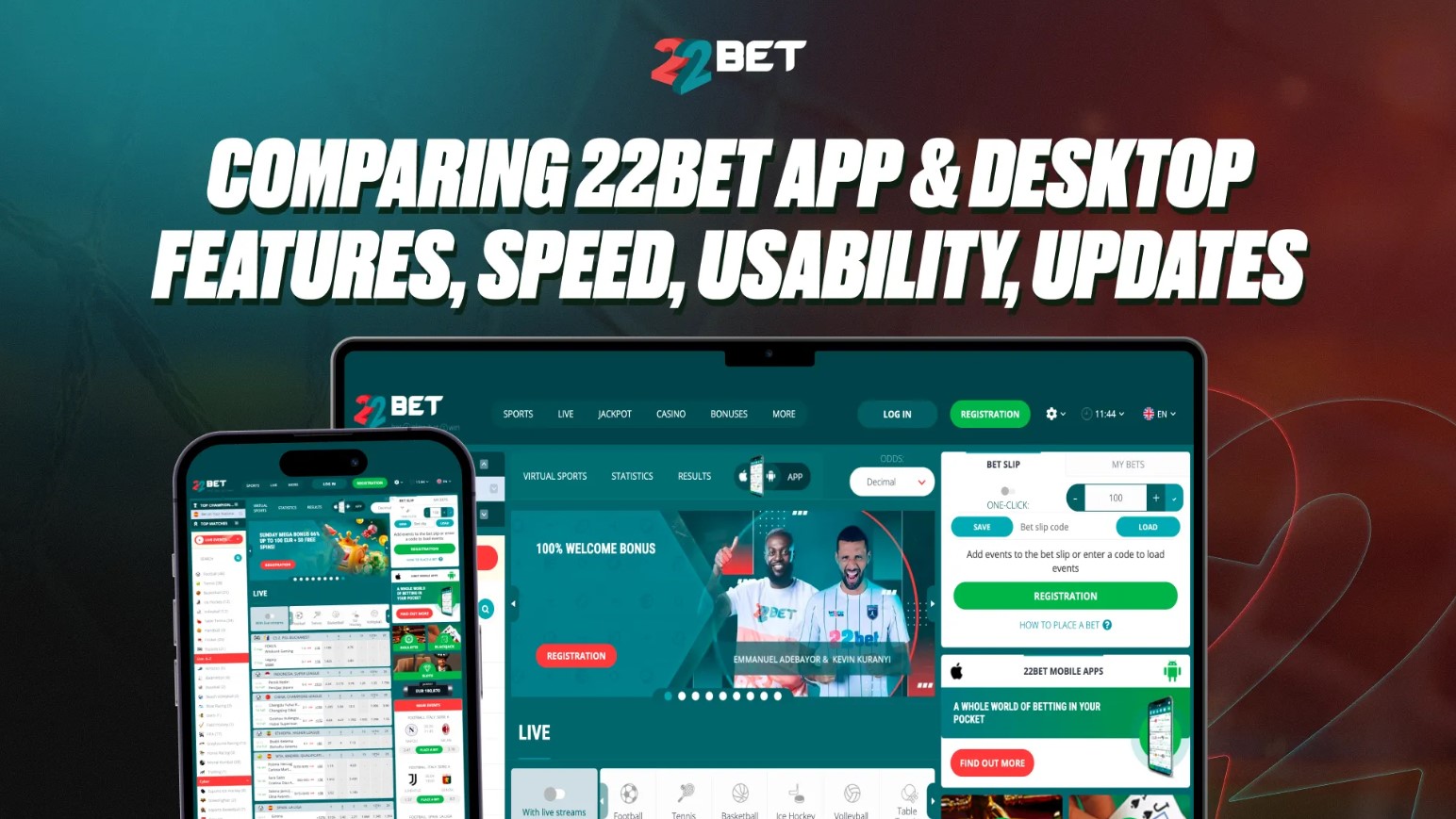
The 22Bet platform looks familiar across devices, but the experience changes between the app, the mobile site, and the desktop version. The app and mobile site put speed and quick actions first. On the desktop, there’s more space, with extra on-screen information, and easier navigation when looking at complex markets.

22Bet App, Desktop, and Website Overview
The 22Bet Website (Desktop & Mobile Browser)
The 22Bet website uses a responsive design. When you open it in a mobile browser, it adjusts to fit your screen. The layout changes for touch controls and smaller displays, but it is still the same website with the same betting options.
Desktop Layout
On the desktop, the 22Bet website shows odds, matches, statistics, bet slip, casino links, and account settings in separate sections. Sports, live betting, casino games, promotions, and account tools all stay visible through clear menus and navigation tabs. New users can move around the site without trouble.
The 22Bet App (Android & iPhone)
The 22Bet app comes in several forms. There is a native mobile application for Android and iPhone devices. iPhone users can download it from the App Store in supported regions. Android users can get it from Google Play, and if it is not available there, they can install the APK directly from the official website.
Progressive Web App (PWA)
The mobile site is also available as a Progressive Web Application (PWA) on Android and Apple devices. The PWA works like an app without taking up storage space. You open the 22Bet mobile website in your browser, save it to your home screen, and it appears with its own icon. It still runs through the browser, but you get quick access and navigation similar to the full app.
One Account Across All Platforms
You only need one account. The same 22Bet login credentials work on the desktop site, mobile website, PWA, and mobile app. Once you sign in, you can switch between devices and still access your sportsbook bets, casino games, account balance, and promotions.
Main Features Available on Both 22Bet Platforms
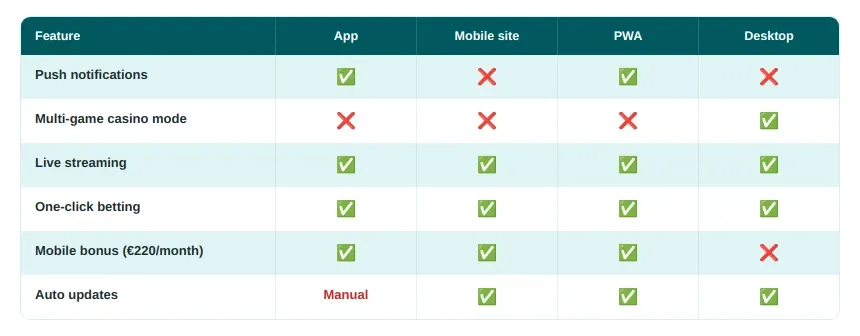
The 22Bet desktop site and mobile versions (site, app, and PWA) include almost all the same tools and markets:
- Sports betting: Pre-match and live markets across 95 sports, including football, tennis, basketball, esports, and more.
- Live betting: In-play betting with real-time odds updates.
- Casino: 9,000+ slots, table games, and live dealer titles.
- Jackpots: Access to jackpot games and virtual sports sections.
- Cashier: Deposits, withdrawals, and account balance management.
- History: Bet history and transaction records.
- Bonuses: Welcome offers, weekly promotions, and bonus tracking.
- Live streaming: Video streams for selected sporting events.
- Statistics: Form guides, match data, head-to-head records, and live stats.
- Betting tools: One-click betting, cash out, and bet builder features.
You can switch between football, tennis, basketball, esports, and casino games on both platforms. The same promotions appear on the 22Bet app and the 22Bet website, including the mobile-exclusive monthly reward of up to €220 (equivalent in African currencies) for active app users.
22Bet App Interface and Navigation
The 22Bet mobile app is built for fast use on a small screen. Compact buttons, short menus, and swipeable sections make it easy to move through the app with one hand.
On the home screen, the main controls sit at the top:
- Registration and Log in: Always visible beside the 22Bet logo.
- Hamburger menu: Opens the full list of sections and account settings.
- Quick tabs: Sports, Live, and Slots appear below the top bar for fast switching.
The app layout depends on vertical scrolling and horizontal swiping. You scroll down to browse matches and game tiles, while the sports and market categories move sideways.
The pre-match and live betting section includes:
- All Sports: Complete list of available sports.
- Favourites: Saved leagues and teams.
- Long-Term Bets: Outright and future markets.
- Sport tabs: Football, Tennis, Basketball, and other sports shown in a swipeable row.
- Time filters (only in pre-match): Shortcuts such as “< 1 hr.” and “< 2 hrs.” to show upcoming events.
Across the sportsbook and casino games, the app includes:
- Search icon: Quickly find a match, team, league, provider, or slot game.
- Filter button: Sort sports events by market type, time, or sport, and casino games by provider or categories such as Hot, Crash, and Personal Picks.
- Categories: Separate tabs for Slots, Live Casino, and Sports, plus extra categories inside each section.
- Compact event cards: Matches, slot games, and odds shown in stacked mobile-friendly boxes.
- Live stream toggle: Switch to events with live streaming where available.
- Push notifications: Updates for bets, goals, and promotions.
- Chat bubble: Connect with a live agent.
The bet slip on the 22Bet mobile app is simpler than on desktop. Once you tap an odd, the bet slip slides up from the bottom of the screen. You can change the stake, use quick amount buttons, and place the bet without leaving the page.
Desktop Version of 22Bet — Website Layout and Tools
The 22Bet desktop gives you more information at once. The website layout uses three main sections:
- Left side: Sports list, top matchups, and search bar.
- Centre: Matches, odds, and markets.
- Right side: Bet slip, account tools, casino shortcuts, and the chat icon.
That layout is easier to use when you want to compare several matches at once. For example, on the 22Bet website, you can keep:
- Football match: Live event open in the centre.
- Extra markets: Tennis or other sports shown below.
- Bet slip: Always visible on the right.
- Statistics: Live match data and head-to-head records on the side.
The extra screen space makes the desktop version stronger for players who use accumulators, compare odds, or study statistics before placing a bet.
The desktop interface also gives you faster access to:
- Filters: Detailed market and event filters.
- Statistics: Match data, form, and head-to-head records.
- Tabs: Several sports or pages open at the same time.
- Streaming: Larger live stream and event windows.
- Settings: Odds format, language, and account options.
In the casino section, the desktop layout follows the same structure. Game categories and filters appear on the left side, making it easy to find a game. The centre of the screen shows the available options, while search and sorting tools stay visible.
When you click on a game, it opens in the same browser window rather than on a separate page. The desktop version also includes a multi-game mode that lets you run two or four casino games at once in a grid layout. This is useful if you want to keep one game open while trying another.
Speed and Performance Comparison: App vs Desktop
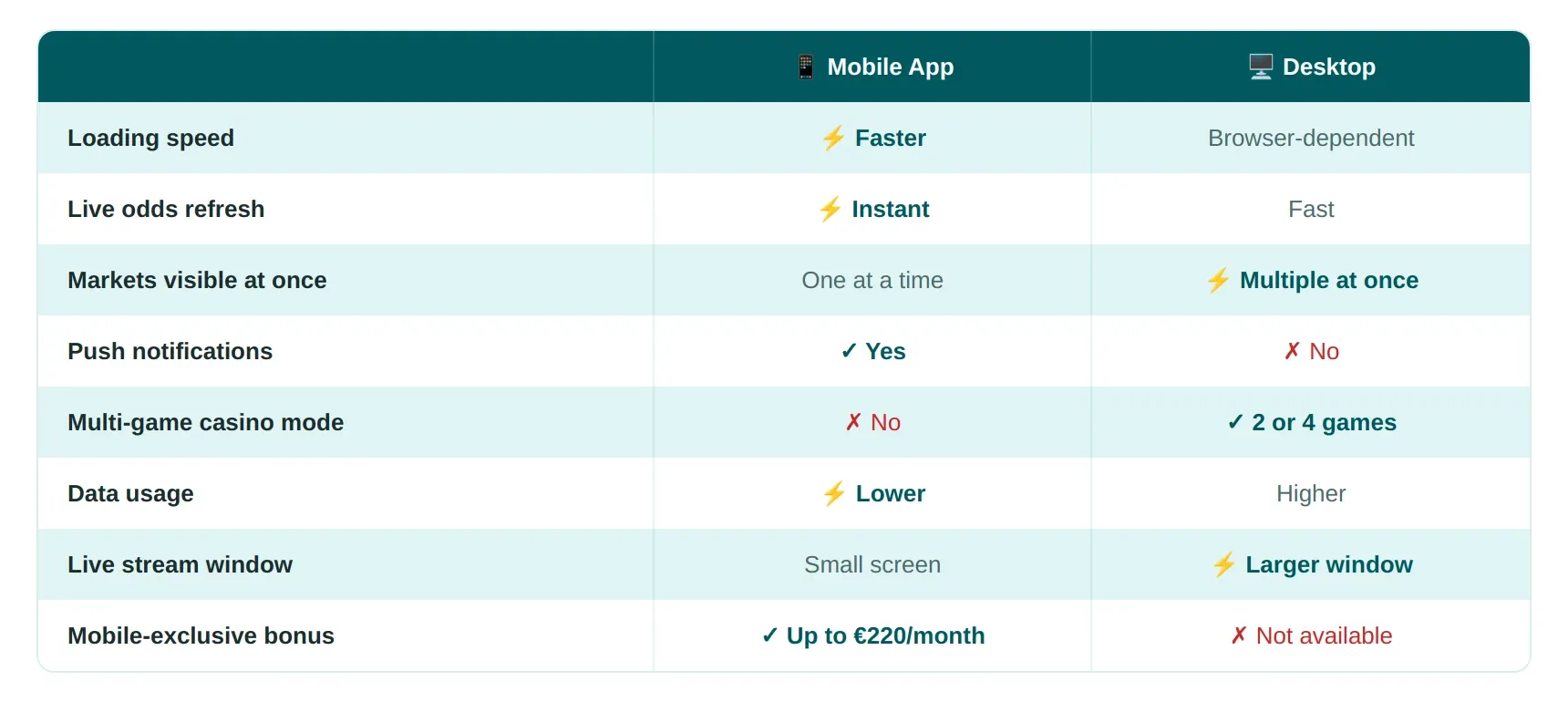
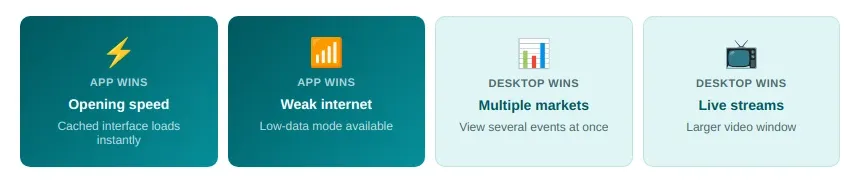
The 22Bet app is slightly faster in daily use. It stores part of the design and navigation on your phone, so pages load faster after the first visit. Odds refresh quickly, menus open instantly, and the platform uses less mobile data.
The desktop website depends more on browser speed and internet connection. It still loads quickly, but large pages with many live events can take longer, especially if several tabs are open.
When compared, the app wins in:
- Opening speed.
- Live odds refresh.
- Faster return after closing the app.
- Lower battery and data use.
The desktop version is better for:
- Viewing several markets together.
- Large live streams.
- Less scrolling.
- Better visibility of statistics and odds history.
If your internet is slow, the 22Bet mobile app performs better, thanks to a lighter design and a special low-data mode.
Usability Differences Between Mobile App and Desktop Browser
The 22Bet mobile app is better for quick sessions. It is easier to use when you want to place a fast bet, check a score, or follow one match while away from home.
The desktop version is ideal for longer sessions. The larger screen, keyboard, and mouse make it easier to compare odds, build accumulator bets, switch between tabs, and use statistics alongside the bet slip.
Betting Experience — Placing Bets on App vs Desktop
Placing a bet is simple on both platforms. Follow these steps.
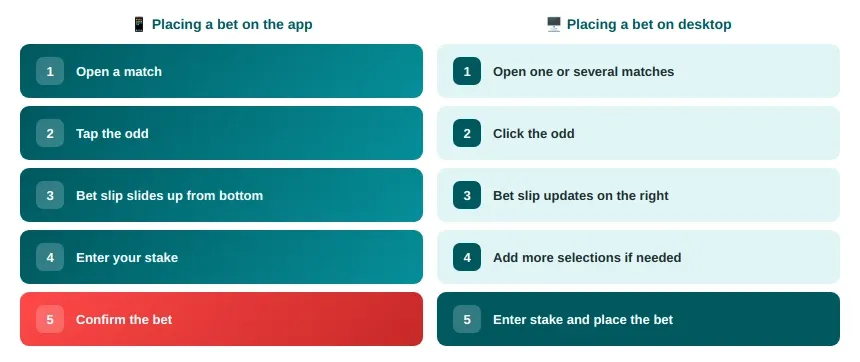
The desktop version is superior for complex bets because the bet slip always stays visible. You can edit several selections without changing screens. The app is better for live betting because it is faster to tap a market and confirm it.
Both platforms support live streams. The desktop gives you a larger video window, while the app makes it easier to watch and bet at the same time.
Updates and Maintenance: App Updates vs Website Changes
The 22Bet website updates automatically. Refresh the page, and any new design, feature, or fix appears immediately. The app works differently and needs manual updates.
On iPhone, updates arrive through the App Store. For Android, users who installed the APK must download the latest version from the 22Bet official website when an update is released.
If you keep using an old version of the app, problems can start to appear, including:
- Slow loading: Pages and odds take longer to open.
- Login issues: The 22Bet app login could stop working properly.
- Missing markets: Some sports or casino sections may not appear.
- Crashes: The app can freeze during live betting or live streaming.
The desktop website has fewer maintenance issues because all changes happen directly on the server.
Pros and Cons of Using the 22Bet Mobile App
| Pros | Cons |
|---|---|
| Faster loading and better responsiveness | Smaller screen |
| Easier to use during live betting. | More scrolling. |
| Push notifications for bets and match updates. | Harder to compare many markets together. |
| Lower data usage. | APK updates on Android take extra steps. |
| Works well on a weaker internet. | Less useful for complex accumulator bets. |
| Keeps you signed in securely. |
Pros and Cons of Using the 22Bet Desktop Version
| Pros | Cons |
|---|---|
| Bigger layout and easier navigation. | Slower than the app on a weaker internet. |
| Better for comparing odds and statistics. | Less convenient outside the house. |
| Stronger for accumulator bets and live analysis. | No push notifications from the browser. |
| Larger live stream window. | Uses more data and more screen space. |
| Easier to use with several tabs. |
Tips for Choosing the Best Platform for Your Betting Style
The 22Bet online platform gives you the same sportsbook, casino games, live betting, and account features on both the desktop site and the mobile app. The real difference comes down to where and how you want to use it.
When to Use the App
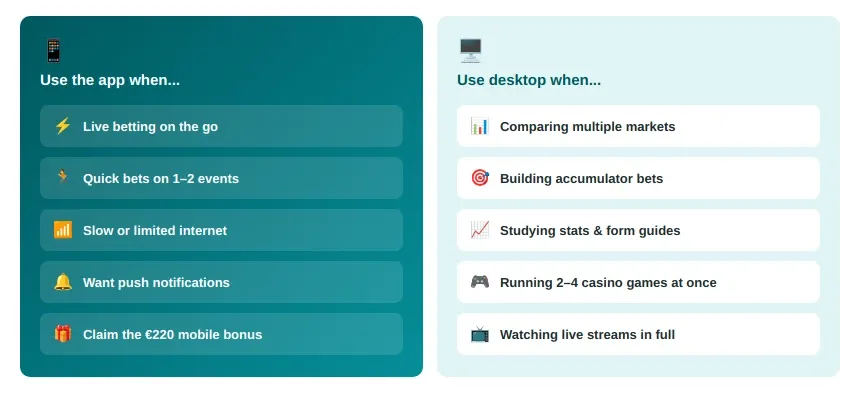
The mobile app is always ready. You can use it anywhere, anytime. It suits quick sessions and live betting day and night. The desktop site works best when you want more information on screen. You can compare several matches, study statistics, follow odds changes, and build larger accumulator bets more easily.
Which Platform Suits Your Betting Style
If you mainly place live bets and follow one or two events at a time, the app is the stronger option. If you spend more time analysing markets before betting, the desktop version makes more sense.
Best Approach: Use Both
The best approach is to use both. Many players research matches and decide on bets through the desktop site, then place them through the mobile app later. That way, you still get the speed of mobile betting and can qualify for the mobile-exclusive reward of up to €220 per month.